

Discover practical ways to access the internet, power your communication equipment, and stay connected while living off-grid or preparing for emergencies.
Living off-grid doesn’t necessarily mean disconnecting from the modern world.
Whether you’re maintaining a remote homestead, working from a rural cabin, traveling in an RV, or preparing for an extended power outage, reliable communication can be essential.
The internet provides access to weather forecasts, emergency alerts, educational resources, medical information, banking, and communication with family and friends.
However, obtaining a reliable connection becomes more challenging when traditional electrical service, cable lines, and nearby cellular towers are unavailable.
Fortunately, modern technology offers several solutions.
From satellite internet and solar-powered equipment to cellular hotspots and community networks, it is increasingly possible to remain connected without depending entirely on conventional infrastructure.
The key is choosing the right combination of internet service, equipment, electrical power, and backup communication methods.
1. Satellite Internet: Connecting Remote Locations

Satellite internet is one of the most practical solutions for properties located beyond the reach of cable, fiber-optic, or reliable cellular service.
Instead of transmitting data through a physical cable connected to your home, satellite systems communicate with satellites orbiting Earth.
There are two major types of satellite internet.
Geostationary Satellite Internet
Traditional satellite internet uses satellites positioned approximately 22,236 miles above Earth’s equator.
These satellites appear stationary relative to the ground, allowing a fixed dish to communicate with them.
Advantages include coverage across many rural areas and established service options.
However, the great distance between Earth and the satellite creates noticeable communication delays, known as latency.
This can affect video calls, online gaming, and other activities requiring quick responses.
Low Earth Orbit (LEO) Satellite Internet
Low Earth Orbit systems use satellites traveling much closer to Earth.
Because the signals travel shorter distances, these networks can provide significantly lower latency than traditional geostationary satellite services.
One familiar example is Starlink, operated by SpaceX.
Other satellite network operators and service providers are developing or expanding similar technologies, although residential availability varies.
What Equipment Do You Need?
A typical satellite internet installation requires:
- A compatible satellite antenna or user terminal
- A router or modem
- A clear view of the required portion of the sky
- A suitable mounting location
- A power supply
- An active internet subscription
Trees, buildings, mountains, and other obstructions may interfere with reception.
Important Off-Grid Consideration
Satellite internet is not automatically independent of electricity.
The antenna, router, and associated equipment require continuous electrical power while operating.
Before purchasing a system, check its actual power consumption and determine how you will operate it overnight or during cloudy weather.
2. Solar-Powered Internet: Running Your Connection Without the Grid
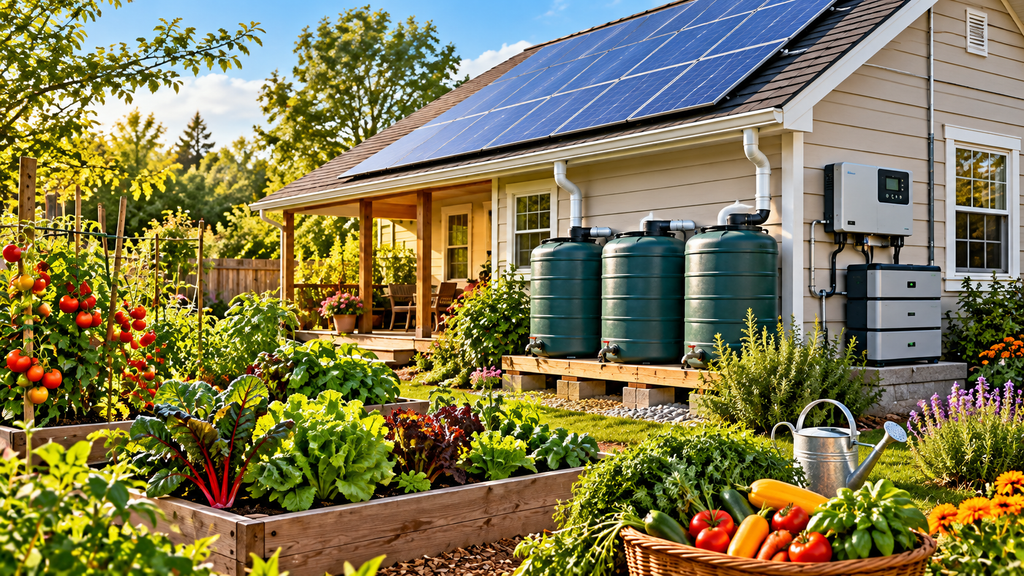
Solar power is a practical way to operate communication equipment where conventional electricity is unavailable.
A properly designed system can supply power during daylight hours and store energy for use after sunset.
Basic Components of a Solar Internet System
A typical setup includes:
Solar panels: Convert sunlight into electrical energy.
Charge controller: Regulates electricity flowing from the solar panels to the battery.
Battery storage: Stores energy for nighttime operation and periods of limited sunlight.
Inverter or DC power adapter: Supplies the voltage required by your equipment.
Internet equipment: A satellite terminal, cellular modem, router, or other connection device.
Using compatible DC-powered equipment can sometimes reduce energy losses associated with converting battery power into household AC electricity.
How Much Electricity Does Internet Equipment Use?
Power requirements vary considerably.
A small, energy-efficient cellular router might use only a few watts, while some satellite systems can require substantially more electricity.
For example, consider a hypothetical internet setup that uses an average of 50 watts.
Operating continuously for 24 hours would require:
50 watts × 24 hours = 1,200 watt-hours, or 1.2 kilowatt-hours per day.
That figure does not include battery charging losses, inverter losses, or additional devices.
A system consuming 15 watts would use approximately 360 watt-hours per day.
These differences can dramatically affect the number of solar panels and batteries needed.
Calculate Your Energy Needs Before Buying Equipment
First, determine the wattage of the devices you plan to operate.
Multiply each device’s power consumption by the number of hours you expect to use it.
Then allow additional capacity for conversion losses, cloudy weather, and battery reserve.
A solar installation should be designed around your actual energy consumption, location, seasonal sunlight, and desired backup duration.
For permanent systems, use appropriate electrical protection and qualified installation where required.
3. Cellular Internet and Mobile Hotspots

For many rural households, cellular internet is the simplest and least expensive option to investigate first.
If a nearby cellular tower provides usable coverage, a smartphone or dedicated cellular router may deliver sufficient internet service without requiring satellite equipment.
Smartphone Hotspots
Many smartphones can share their cellular data connection with laptops, tablets, and other devices.
This feature is often called tethering or a mobile hotspot.
It can be especially useful for occasional internet access or emergency communication.
However, hotspot usage may be subject to data limits, reduced speeds, or plan restrictions.
Dedicated Cellular Routers
A cellular router uses a SIM or eSIM connection to access a mobile network and distribute internet service to nearby devices.
Some models support external antennas, multiple carriers, or dual-SIM configurations.
These features can be helpful for remote properties.
Improving Weak Cellular Signals
Before investing in expensive equipment, test cellular reception at different locations around your property.
You may discover that reception improves near an upstairs window or in an open outdoor area.
Other options include:
- Outdoor directional antennas
- Compatible cellular routers with antenna connections
- Approved cellular signal boosters
- Elevated antenna mounting locations
A signal booster can improve an existing usable signal, but it cannot create coverage where no compatible cellular signal exists.
Also remember that cellular towers may lose power or become congested during major emergencies.
4. Mesh Networks: Building Community Connections
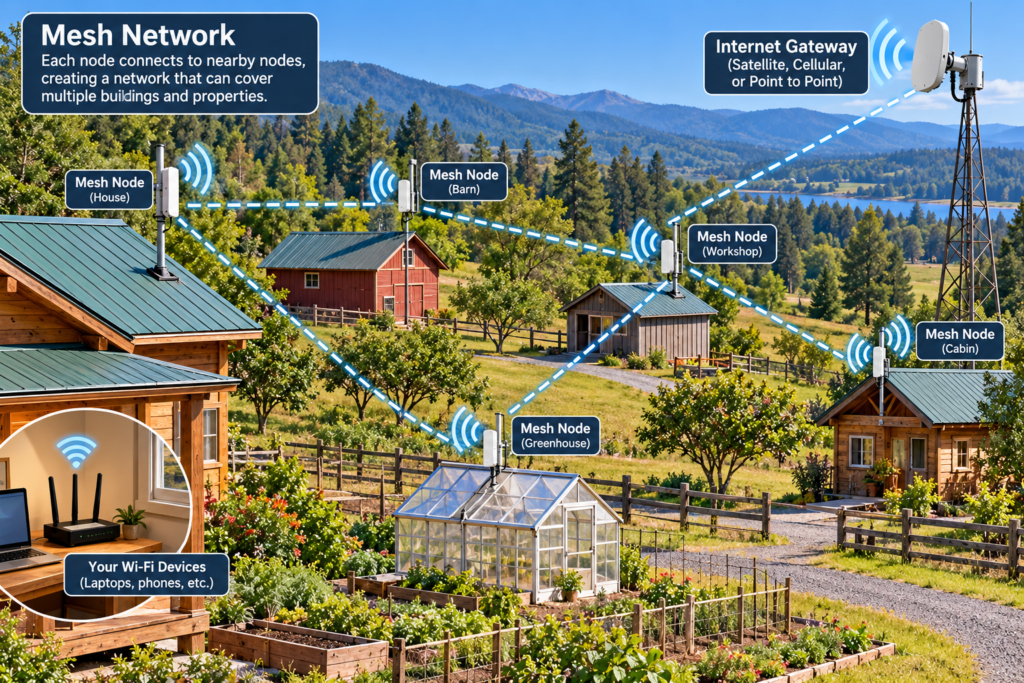
A mesh network consists of multiple connected devices, often called nodes, that can communicate with one another.
Instead of relying on a single central connection, certain mesh systems can pass data between participating nodes.
This approach can be useful in rural communities, neighborhoods, farms, and emergency communication projects.
How Mesh Networks Work
Imagine several neighboring properties equipped with compatible wireless communication devices.
Depending on the equipment, terrain, distance, and network design, these devices may be able to exchange messages or data.
Some systems can also share access to an internet gateway.
Benefits of Community Networks
Mesh networking can offer several advantages:
- Communication between participating properties
- Opportunities to share certain network resources
- Local communication during some internet outages
- Expandable coverage through additional nodes
- Community control over equipment and configuration
However, a mesh network does not automatically provide internet access.
Without a functioning connection to an internet provider, it may only support communication among devices on the local network.
Long-Range Low-Power Messaging
Certain mesh systems use low-power radio technologies, such as LoRa, to exchange short messages over relatively long distances.
Projects such as Meshtastic demonstrate how compatible devices can support decentralized text messaging.
These systems are not substitutes for high-speed internet, but they may provide useful supplemental communication where conventional networks are unreliable.
Their performance depends heavily on terrain, antenna placement, interference, and the number of participating devices.
5. Point-to-Point Wireless Internet
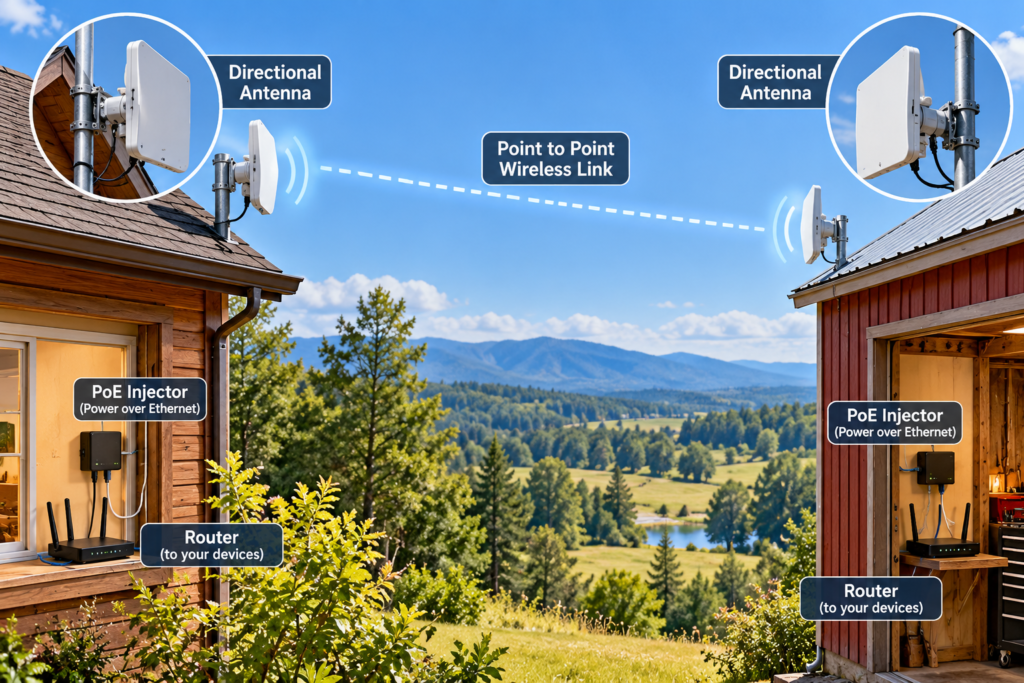
If your property is within sight of another building that already has internet access, a point-to-point wireless connection may be an option.
This technology uses directional wireless equipment to establish a connection between two locations.
For example, a home on a rural property might connect to a workshop or another authorized building with an existing internet connection.
What Makes It Work?
The two locations generally need a sufficiently clear wireless path.
Trees, hills, buildings, and distance can affect performance.
Equipment must also be mounted securely and protected from weather and electrical surges.
Advantages
A properly installed point-to-point connection may provide:
- Good speeds over suitable distances
- Lower recurring costs when using an existing authorized connection
- Connectivity between buildings
- An alternative to running long underground cables
Always confirm that sharing the connection complies with your internet provider’s service agreement and applicable regulations.
6. Choosing Energy-Efficient Internet Equipment
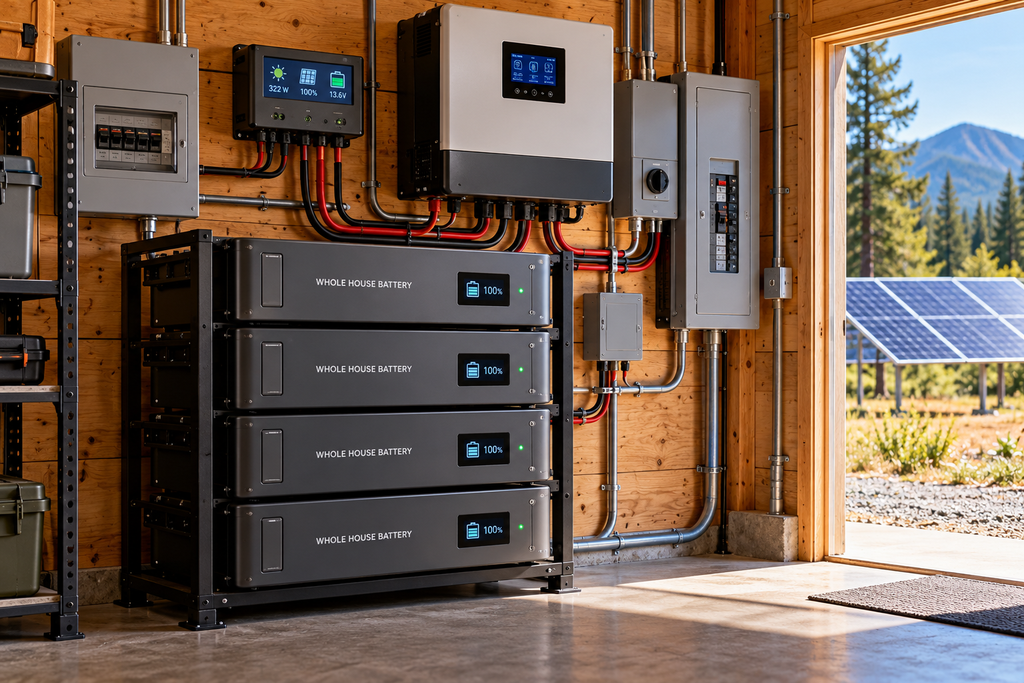
When electricity is limited, every watt matters.
The most powerful router is not necessarily the best choice for an off-grid property.
Look for equipment that provides the connectivity you need without unnecessary energy consumption.
Features Worth Considering
Low power consumption: Check the manufacturer’s operating wattage rather than relying only on marketing claims.
DC power compatibility: Equipment that operates directly from a suitable battery system may reduce conversion losses.
External antenna connections: These can improve reception in difficult locations.
Automatic reconnection: Useful when power or internet service is interrupted.
Multiple connection options: Some routers can switch between cellular and wired connections.
Remote management: Helpful for monitoring equipment at an unattended cabin or property.
If you only need to check email and download weather forecasts occasionally, operating your connection for a few hours each day may save considerable energy compared with leaving it running continuously.
7. Building an Off-Grid Internet Backup System
Reliable communication is especially important during emergencies.
A single internet connection can fail because of equipment problems, severe weather, network congestion, or service outages.
For households that depend on internet access, having a backup is worth considering.
A Practical Backup Arrangement
A remote homestead might use satellite internet as its primary connection and a cellular hotspot as a backup.
https://starlink.com/?srsltid=AYCX9vK4xPGzOTfu6BJ40svXw4zXOqWhoS18sm8UdOBCY7EnIiFZenQP
Both could be powered through a properly sized battery system.
A small solar charger or portable power station could provide additional support for phones and low-power devices.
However, maintaining electrical power does not guarantee that the internet service itself will remain operational.
Protect Your Equipment
Consider surge protection, weather-resistant cable routing, appropriate grounding, and secure mounting.
Keep spare charging cables and essential adapters.
For critical equipment, maintain written setup instructions and account information in a secure location.
Test your backup system before an emergency occurs.
8. Emergency Communication When the Internet Is Down
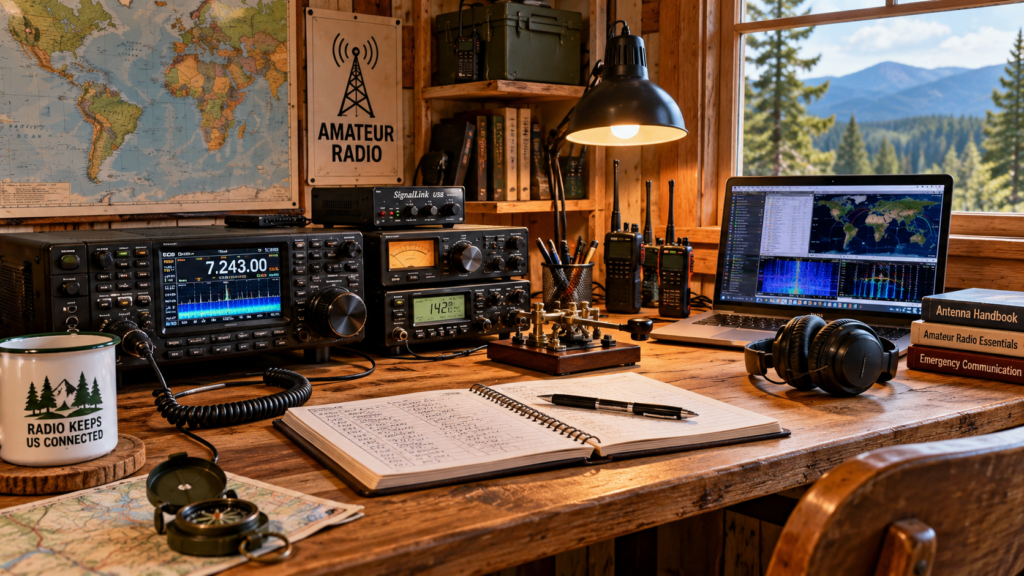
Even a carefully designed off-grid internet system can fail.
For that reason, emergency preparedness should include communication methods that do not depend entirely on internet service.
Weather Radio
A battery-powered or hand-crank weather radio can provide official weather warnings where supported.
In the United States, NOAA Weather Radio broadcasts weather information and emergency alerts across much of the country.
Two-Way Radios
Certain two-way radios can provide short-distance communication without cellular service.
Range depends on equipment, terrain, buildings, and legal operating limits.
Some radio services require licenses.
Amateur Radio
Amateur radio can support local, regional, and sometimes long-distance communication.
In the United States, transmitting on amateur radio frequencies generally requires an FCC amateur radio license, subject to limited emergency exceptions.
Training and regular practice are essential.
Satellite Emergency Messengers
Dedicated satellite messengers and certain compatible smartphones can provide emergency messaging capabilities outside cellular coverage.
Features, geographic coverage, subscription requirements, and emergency-service availability vary.
These devices are designed for limited communications rather than full internet access.
Keep Important Information Offline
Download or print essential information before an emergency.
Useful materials include maps, emergency contacts, medical information, equipment instructions, and evacuation routes.
An offline map can be extremely valuable when cellular data becomes unavailable.
9. Internet Security and Privacy Off the Grid
Living remotely does not eliminate online security risks.
Protecting your network is just as important in a cabin or homestead as it is in a city.
Use strong, unique passwords for your router and online accounts.
Enable modern Wi-Fi security, such as WPA2-AES or WPA3 where supported.
Keep equipment firmware updated and use multifactor authentication for important accounts.
Avoid exposing router administration interfaces directly to the public internet.
If several households share a community network, establish clear rules for access, maintenance, privacy, and responsibility.
A secure network is particularly important when internet connectivity supports home security cameras, financial transactions, or remote work.
10. Comparing Off-Grid Internet Options
Different systems suit different needs and locations.
| Connection Type | Main Advantage | Main Limitation |
| LEO satellite | Broadband access in many remote locations | Equipment, power, and subscription costs |
| Traditional satellite | Coverage in many rural areas | Higher latency |
| Cellular hotspot | Portable and often simple to use | Depends on tower coverage |
| Cellular router | Can support external antennas and multiple devices | Signal and data-plan limitations |
| Point-to-point wireless | Connects suitable distant buildings | Requires a usable wireless path and authorized source |
| Mesh network | Can support local or community communication | Does not inherently provide internet access |
| LoRa messaging | Low-power short-message communication | Not suitable for normal broadband internet |
There is no single best solution for every property.
A location with excellent cellular coverage may need only a modest hotspot and battery backup.
A remote mountain cabin might benefit more from satellite internet.
A rural neighborhood may find value in combining several technologies.
11. How Much Does Off-Grid Internet Cost?
The total cost depends on more than the monthly internet subscription.
Consider the following expenses when planning your system:
Initial equipment: Antennas, routers, satellite terminals, mounts, cables, and installation materials.
Power equipment: Solar panels, batteries, charge controllers, inverters, and electrical protection.
Monthly service: Internet subscriptions and data plans.
Maintenance: Replacement batteries, damaged cables, weatherproofing, and occasional equipment upgrades.
Backup connectivity: A secondary provider or emergency messaging subscription.
For a realistic comparison, calculate both the initial investment and the expected cost of operation over several years.
Service plans, hardware prices, and availability can change, so verify current details before purchasing.
12. A Simple Plan for Getting Connected Off the Grid
If you’re setting up internet at a remote property, follow these steps.
Step 1: Determine what you need. Occasional email requires much less bandwidth than video conferencing, streaming, or operating a home business.
Step 2: Check available services. Investigate cellular coverage, satellite providers, and any nearby authorized wireless connection opportunities.
Step 3: Test reception. Where possible, test cellular performance on the property before committing to equipment.
Step 4: Estimate electricity use. Calculate the daily energy requirements of your internet equipment and connected devices.
Step 5: Choose your power source. Determine whether solar panels, batteries, or another suitable power arrangement can support your needs.
Step 6: Plan for interruptions. Keep an alternative communication method available.
Step 7: Test the complete system. Verify that the equipment works during the day, overnight, and under realistic operating conditions.
Final Thoughts: Independence Doesn’t Have to Mean Isolation
Off-grid living is about having greater control over your resources and reducing dependence on conventional infrastructure.
It doesn’t require abandoning the benefits of modern communication.
Satellite internet, cellular networks, solar power, wireless links, and decentralized messaging systems offer practical ways to remain connected from remote locations.
The most resilient approach combines an appropriate internet connection with reliable power, sensible backups, and communication methods that can operate when ordinary networks fail.
Whether you’re building a permanent off-grid homestead or simply preparing your household for unexpected disruptions, developing a dependable communication plan is another important step toward self-sufficiency.
True preparedness means having more than one way to stay informed, connected, and safe.
Explore more practical guides to solar power, emergency preparedness, water storage, and backyard self-sufficiency at SurviveInYourBackyard.com.